主题
绘图功能
LaTeX 不仅可以排版文字,还支持通过代码绘制图形。本章节将介绍一些基本的绘图功能,特别是 TikZ 宏包的使用。
绘图语言简介
LaTeX 提供了原始的 picture 环境,可以绘制简单图形,但功能有限。目前流行的 LaTeX 绘图工具包括:
- PSTricks:基于 PostScript 语法,绘图能力强,但在现代编译命令下使用不太方便
- TikZ & pgf:由 Till Tantau 教授开发,支持多种编译命令,语法友好
- METAPOST & Asymptote:功能强大的独立绘图程序,可以与 LaTeX 配合使用
本手册将重点介绍 TikZ 宏包的基础用法。
TikZ 绘图语言
在导言区加载 TikZ 宏包:
latex
\usepackage{tikz}TikZ 提供了以下使用方式:
latex
\tikz[选项]<TikZ 代码>
\tikz[选项]{<TikZ 代码1>};<TikZ 代码2>;…}
\begin{tikzpicture}[选项]
<TikZ 代码1>;
<TikZ 代码2>;
…
\end{tikzpicture}
TikZ 坐标与路径
TikZ 支持直角坐标和极坐标:
- 直角坐标:
(x,y),默认单位为 cm - 极坐标:
(<角度>:半径),角度单位为度
使用 \coordinate 命令为点命名:
latex
\begin{tikzpicture}
\coordinate (A) at (0,0);
\draw (A) -- (30:1);
\draw (1,0) -- (2,1);
\coordinate (s) at (0,1);
\draw (s) -- (1,1);
\end{tikzpicture}
使用垂足形式表示坐标:
latex
\begin{tikzpicture}
\coordinate (S) at (2,2);
\draw[gray] (-1,2) -- (S);
\draw[gray] (2,-1) -- (S);
\draw[red] (0,0) -- (0,0 -| S);  % 垂直投影
\draw[blue] (0,0) -- (0,0 |- S);  % 水平投影
\end{tikzpicture}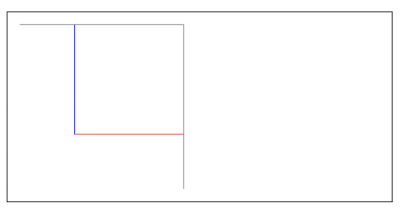
基本路径操作
绘制基本路径:
latex
\begin{tikzpicture}
\draw (0,1) rectangle (1,2);  % 矩形
\draw (2,1.5) circle [radius=0.5];  % 圆形
\draw (4,1.5) ellipse [x radius=1,y radius=0.5];  % 椭圆形
\end{tikzpicture}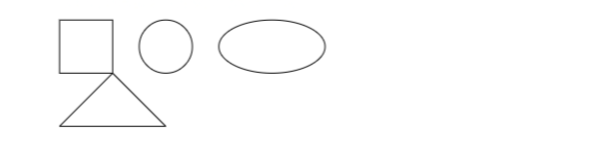
路径样式
设置路径样式:
latex
\begin{tikzpicture}
\draw[red] (0,0) -- (1,1);  % 红色线条
\draw[blue, thick] (1,0) -- (2,1);  % 蓝色粗线
\draw[green, dashed] (2,0) -- (3,1);  % 绿色虚线
\draw[cyan, dotted] (3,0) -- (4,1);  % 青色点线
\draw[magenta, line width=3pt] (4,0) -- (5,1);  % 紫色粗线
\end{tikzpicture}
节点与文本
使用节点添加文本:
latex
\begin{tikzpicture}
\node at (0,0) {起点};
\node at (2,1) {终点};
\draw (0,0) -- (2,1);

\node[draw, circle] at (1,0.5) {中间点};
\end{tikzpicture}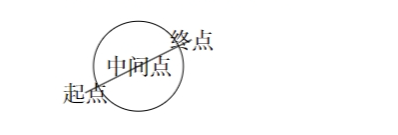
简单图形示例
绘制一个简单的流程图:
latex
\begin{tikzpicture}
\node[draw, rectangle] (start) at (0,0) {开始};
\node[draw, rectangle] (process) at (0,-2) {处理};
\node[draw, diamond] (decision) at (0,-4) {判断};
\node[draw, rectangle] (end) at (0,-6) {结束};

\draw[->] (start) -- (process);
\draw[->] (process) -- (decision);
\draw[->] (decision) -- node[left] {是} (end);
\draw[->] (decision) -- node[right] {否} (1.5,-4) |- (process);
\end{tikzpicture}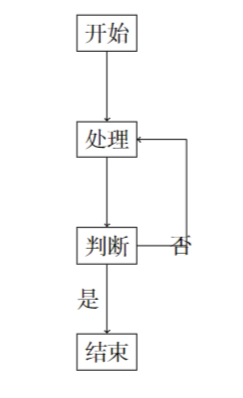
高级绘图功能
TikZ 还支持更高级的绘图功能,如:
- 贝塞尔曲线
- 坐标变换
- 图案填充
- 渐变效果
- 三维绘图(通过 tikz-3dplot 宏包)
这些高级功能超出了入门手册的范围,感兴趣的读者可以参考 TikZ 官方文档。
其他绘图工具
除了 TikZ,还有一些专门用途的绘图宏包:
pgfplots:用于绘制各种类型的图表tikz-cd:用于绘制交换图forest:用于绘制树状图chemfig:用于绘制化学结构式circuitikz:用于绘制电路图
这些宏包都基于 TikZ 或提供了与 TikZ 类似的接口,可以根据需要选择使用。