主题
数学公式排版
LaTeX 最为强大的功能之一就是排版数学公式,无论是简单的行内公式还是复杂的数学推导,都能轻松应对。本章节将介绍 LaTeX 中数学公式的基础排版方法以及一些进阶技巧。
数学公式的基础排版
行内与行间公式
在 LaTeX 中,数学公式主要分为两种形式:
- 行内公式:直接嵌入文本中的公式,使用
$...$或\(...\)包裹 - 行间公式:独立成行并居中显示的公式,使用
$$...$$或\[...\]包裹
例如:
latex
在爱因斯坦的质能方程 $E=mc^2$ 中,能量 $E$ 与质量 $m$ 成正比。

而牛顿第二定律则通常表示为:
$$F=ma$$
AMS 宏集介绍
AMS 宏集是美国数学学会开发的一系列 LaTeX 扩展,极大地增强了数学公式的排版能力。其中最常用的是 amsmath 宏包,建议在所有包含数学公式的文档中加载:
latex
\usepackage{amsmath}此外,amssymb 宏包提供了更多数学符号,也可以选择性加载:
latex
\usepackage{amssymb}数学模式的特点
数学模式下的排版规则与普通文本模式有所不同:
- 字体变化:数学符号和变量默认使用斜体(罗马体字母除外)
- 间距调整:自动根据符号类型调整间距(如运算符两侧的间距)
- 特殊符号:提供大量数学专用符号(如希腊字母、箭头等)
- 自动编号:可对行间公式进行自动编号和交叉引用
数学符号
希腊字母
LaTeX 提供了完整的希腊字母支持,小写希腊字母使用 \alpha、\beta 等命令,大写希腊字母使用 \Alpha、\Beta 等命令:
latex
\alpha, \beta, \gamma, \delta, \epsilon, \zeta, \eta, \theta, \iota, \kappa, \lambda, \mu, \nu, \xi, \pi, \rho, \sigma, \tau, \upsilon, \phi, \chi, \psi, \omega
\Alpha, \Beta, \Gamma, \Delta, \Epsilon, \Zeta, \Eta, \Theta, \Iota, \Kappa, \Lambda, \Mu, \Nu, \Xi, \Pi, \Rho, \Sigma, \Tau, \Upsilon, \Phi, \Chi, \Psi, \Omega
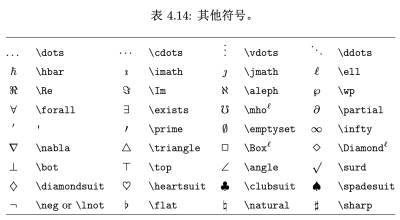
省略号
在数学公式中,省略号的使用有多种形式:
\dots:水平省略号(与周围符号对齐)\cdots:水平居中省略号\vdots:垂直省略号\ddots:对角线省略号
latex
x_1, x_2, \dots, x_n  % 底部对齐省略号
1 + 2 + \cdots + n    % 居中省略号
\begin{pmatrix}
    a_{11} & a_{12} & \cdots & a_{1n} \\
    a_{21} & a_{22} & \cdots & a_{2n} \\
    \vdots & \vdots & \ddots & \vdots \\
    a_{n1} & a_{n2} & \cdots & a_{nn}
\end{pmatrix}        % 矩阵中的省略号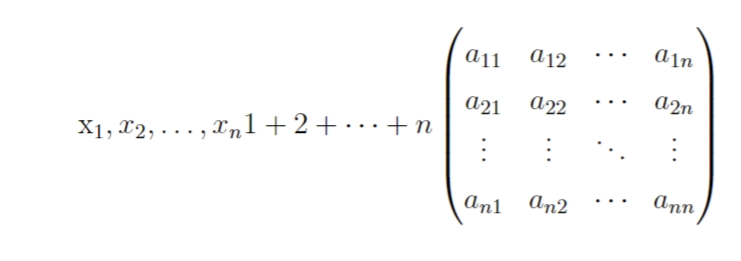
指数与上下标
使用 ^ 表示上标,_ 表示下标:
latex
x^2, x_1, x^2_{12}, e^{i\theta}, \sin^2 x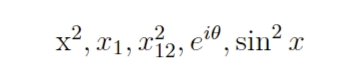
对于导数,可以使用 ' 或 \prime:
latex
f'(x), f''(x), f'''(x), f^{(4)}(x)
分式与根式
使用 \frac{分子}{分母} 表示分式:
latex
\frac{1}{2}, \frac{x+y}{x-y}, \frac{\frac{1}{2}}{\frac{1}{3}} % 嵌套分式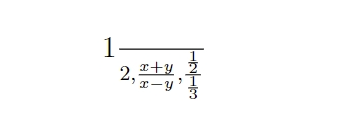
对于行间公式中的大型分式,可以使用 \dfrac:
latex
\[\dfrac{1}{2} + \dfrac{1}{3} = \dfrac{5}{6}\]
使用 \sqrt[n]{表达式} 表示 n 次根式:
latex
\sqrt{2}, \sqrt{x^2 + y^2}, \sqrt[3]{x}, \sqrt[4]{\dfrac{1}{2}}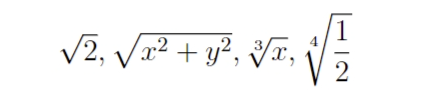
二项式结构
使用 \binom{n}{k} 表示二项式系数:
latex
\binom{n}{k}, \dbinom{n}{k}, (\frac{n}{k})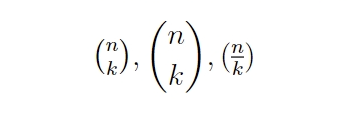
关系符
常用的关系符包括:
latex
=, \neq, \approx, \equiv, \sim, \propto, \leq, \geq, \ll, \gg, \subset, \supset, \subseteq, \supseteq, \in, \ni, \notin算符
基本算符:
latex
+, -, \times, \div, \cdot, *, /, \pm, \mp, \cap, \cup, \setminus特殊算符:
latex
\lim, \sin, \cos, \tan, \log, \ln, \exp, \max, \min, \sum, \prod, \int使用 \DeclareMathOperator 定义自定义算符:
latex
\DeclareMathOperator{\argh}{argh}
\DeclareMathOperator*{\nut}{Nut}

\[\argh 3 = \nut_{x=1} 4x\]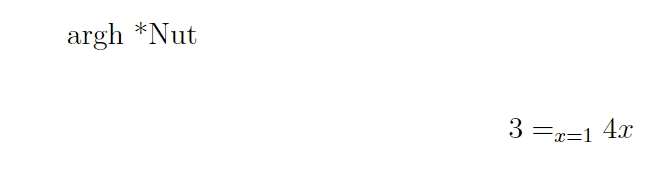
巨算符
积分号、求和号等符号称为巨算符,在行内和行间公式中有不同的大小和形状:
latex
行内:$\sum_{i=1}^n \quad
\int_0^{\frac{\pi}{2}} \quad
\oint_0^{\frac{\pi}{2}} \quad
\prod_\epsilon$ \\
行间:\[\sum_{i=1}^n \quad
\int_0^{\frac{\pi}{2}} \quad
\oint_0^{\frac{\pi}{2}} \quad
\prod_\epsilon\]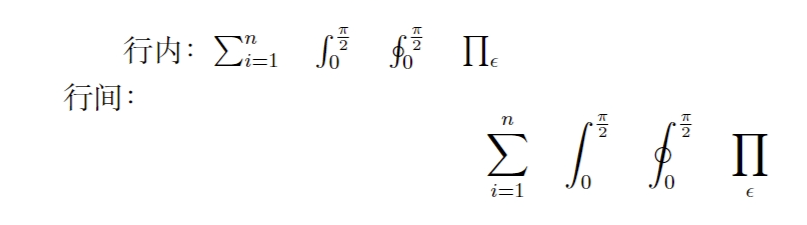
使用 \limits 和 \nolimits 控制巨算符上下标的位置:
latex
行内:$\sum\limits_{i=1}^n \quad
\int\limits_0^{\frac{\pi}{2}} \quad
\prod\limits_\epsilon$ \\
行间:\[\sum\nolimits_{i=1}^n \quad
\int\limits_0^{\frac{\pi}{2}} \quad
\prod\nolimits_\epsilon\]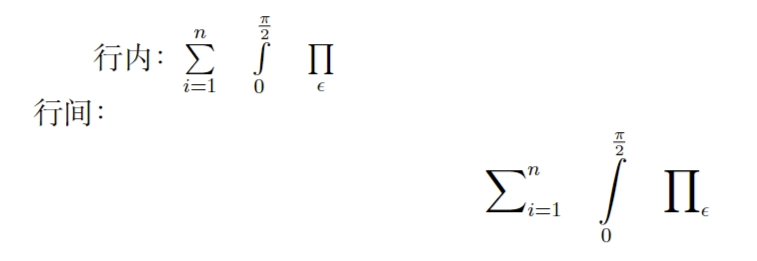
数学重音和上下括号
latex
$\bar{x_0} \quad \bar{x}_0$\\[5pt]
$\vec{x_0} \quad \vec{x}_0$\\[5pt]
$\hat{\mathbf{e}_x} \quad \hat{\mathbf{e}}_x$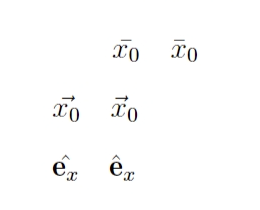
为多个字符加重音:
latex
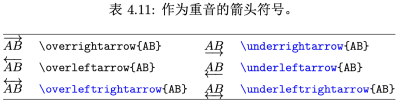
$0.\overline{3} = \underline{\underline{1/3}}$ \\[5pt]
$\hat{XY} \qquad \widehat{XY}$\\[5pt]
$\vec{AB} \qquad \overrightarrow{AB}$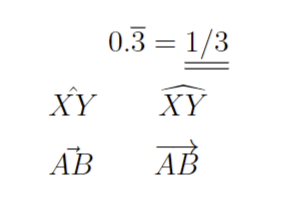
箭头
常用箭头:
latex
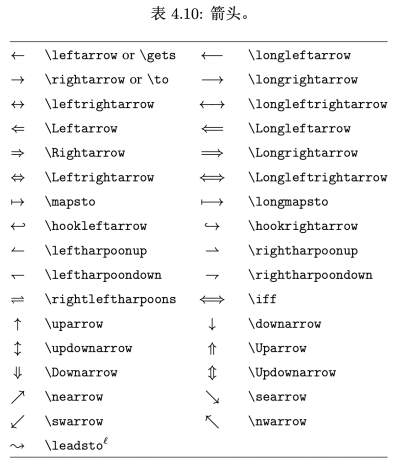
\rightarrow (\to), \leftarrow (\gets), \leftrightarrow, \Rightarrow, \Leftarrow, \Leftrightarrow使用 \xleftarrow 和 \xrightarrow 生成可伸展的箭头:
latex
\[ a\xleftarrow{x+y+z} b \]
\[ c\xrightarrow{x<y}{a*b*c}d \]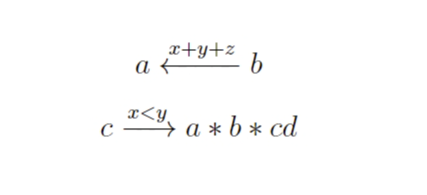
括号和界定符
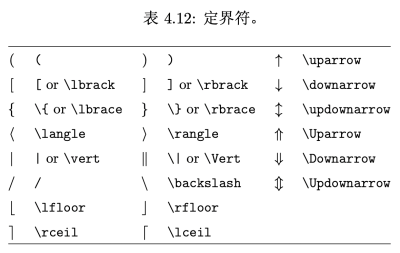
LaTeX 提供多种括号和定界符:
latex
${a,b,c} \neq \{a,b,c\}$使用 \left 和 \right 实现括号自动大小调整:
latex
\[1 + \left(\frac{1}{1-x^{2}} \right)^3 \qquad \left. \frac{\partial f}{\partial t} \right|_{t=0}\]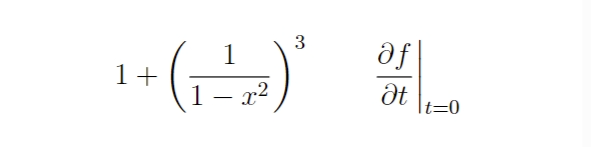
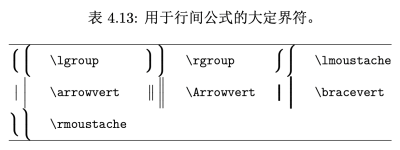
使用 \big、\bigg 等命令手动控制括号大小:
latex
$\Bigl((x+1)(x-1)\Bigr)^{2}$\\
$\bigl( \Bigl( \biggl( \Biggl( \quad \bigr\} \Bigr\} biggr\} \Biggr\} \quad \big\| \Bigr\} \biggr\| \Bigg\| \quad \big\Downarrow \Big\Downarrow \bigg\Downarrow \Bigg\Downarrow$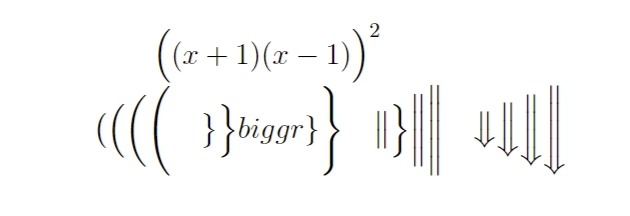
多行公式
长公式折行
避免写出需要折行的长公式。如果必须折行,优先在等号前折行,其次在加号、减号前,再次在乘号、除号前。
使用 multline 环境实现长公式折行:
latex
\begin{multline}
a + b + c + d + e + f + g + h + i \\
= j + k + l + m + n \\
= o + p + q + r + s \\
= t + u + v + x + z
\end{multline}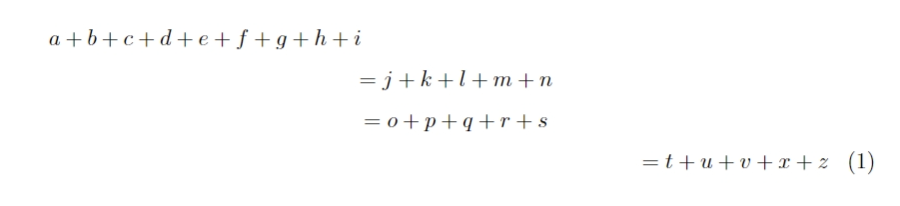
多行公式对齐
使用 align 环境按等号对齐公式:
latex
\begin{align}
a & = b + c \\
& = d + e
\end{align}
使用 gather 环境罗列公式(不按等号对齐):
latex
\begin{gather}
a = b + c \\
d = e + f + g \\
h + i = j + k \
l + m = n
\end{gather}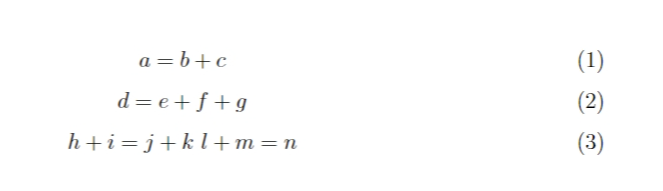
公用编号的多行公式
使用 aligned、gathered 等环境与 equation 环境套用,实现多行公式共用一个编号:
latex
\begin{equation}
\begin{aligned}
a & = b + c \\
& = d + e
\end{aligned}
\end{equation}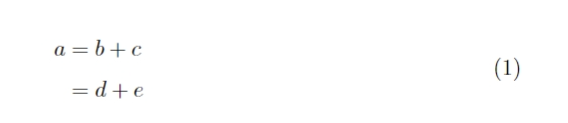
数组与矩阵
使用 array 环境排版二维数组:
latex
\[ \mathbf{x} = \left(
\begin{array}{cccc}
x_{11} & x_{12} & \dots & x_{1n} \\
x_{21} & x_{22} & \dots & x_{2n} \\
\vdots & \vdots & \ddots & \vdots \\
x_{n1} & x_{n2} & \dots & x_{nn}
\end{array} \right) \]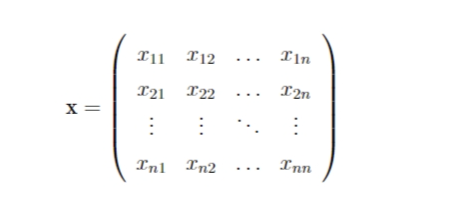
使用 cases 环境排版分段函数:
latex
\[ |x| =
\begin{cases}
-x & \text{if } x < 0, \\
0 & \text{if } x = 0, \\
x & \text{if } x > 0.
\end{cases} \]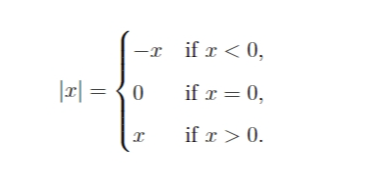
公式中的间距
数学公式中的间距通常由 LaTeX 自动生成,偶尔需要手动调整:
latex
\quad, \qquad, \,, \:, \;, ! % ! 表示负间距修正积分表达式的间距:
latex
\[\int_a^b f(x)\mathrm{d}x \qquad \int_a^b f(x)\,\mathrm{d}x\]多重积分号的处理:
latex
\newcommand\diff{\,\mathrm{d}}
\begin{gather*}
\int\int f(x)g(y)\diff x \diff y \\
\int\!\!\!\int f(x)g(y) \diff x \diff y \\
\iint f(x)g(y) \diff x \diff y \\
\lint\quad \iiint\quad \idotsint
\end{gather*}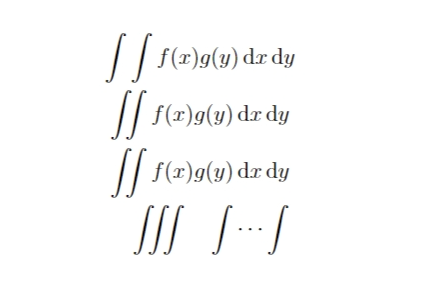
数学符号的字体控制
数学字母字体
latex
$\mathcal{R} \quad
\mathfrak{R} \quad
\mathbb{R}$
\[\mathcal{L} = -\frac{1}{4}F_{\mu\nu}F^{\mu\nu}\]
$\mathfrak{su}(2)$ and $\mathfrak{so}(3)$ Lie algebra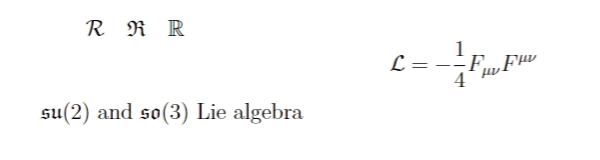
数学符号的尺寸
使用 \displaystyle 等命令控制数学符号尺寸:
latex
\[P = \frac{\sum_{i=1}^n (x_i- x)(y_i- y)}
{\displaystyle
\left[ \sum_{i=1}^n (x_i-x)^2
\sum_{i=1}^n (y_i-y)^2
\right]^{1/2} }\]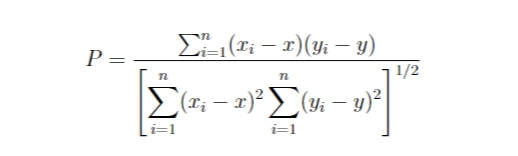
加粗的数学符号
使用 \boldmath 和 \boldsymbol 实现数学符号加粗:
latex
$\mu, M \qquad \mathbf{\mu}, \mathbf{M} \qquad {\boldmath$\mu, M$}$
$\mu, M \qquad \boldsymbol{\mu}, \boldsymbol{M}$
定理环境
LaTeX 原始定理环境
使用 \newtheorem 定义定理环境:
latex
\newtheorem{mythm}{My Theorem}[section]
\begin{mythm}\label{thm:light}
The speed of light in a vacuum is $299,792,458\,\mathrm{m/s}$.
\end{mythm}
\begin{mythm}[Energy-momentum relation]
The relationship between energy, momentum, and mass is $E^2 = m_0^2 c^4 + p^2 c^2$, where $c$ is the speed of light described in theorem \ref{thm:light}.
\end{mythm}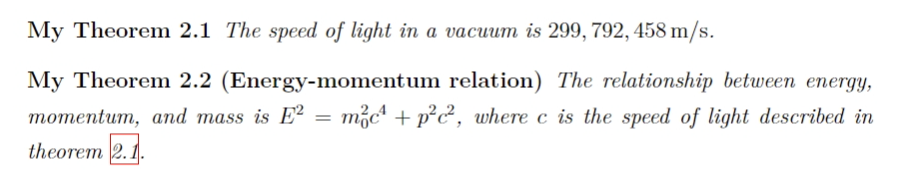
amsthm 宏包
使用 amsthm 宏包提供的定理样式:
latex
\theoremstyle{definition} \newtheorem{law}{Law} \theoremstyle{plain} \newtheorem{jury}{Jury}[law] \theoremstyle{remark} \newtheorem*{mar}{Margaret}证明环境和证毕符号
使用 proof 环境排版证明过程:
latex
\begin{proof}
For simplicity, we use $E=mc^2$. That's it.
\end{proof}
使用 \qedhere 将证毕符号放在公式末尾:
latex
\begin{proof}
For simplicity, we use \[E=mc^2 \qedhere\]
\end{proof}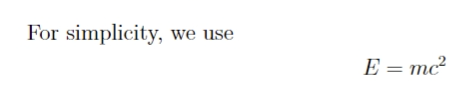
符号表
注意事项:
- 蓝色命令依赖
amsmath宏包 - 带角标 ℓ 的符号命令依赖
latexsym宏包
LaTeX 普通符号
包括文本/数学模式通用符号、希腊字母、二元关系符和数学重音符号。
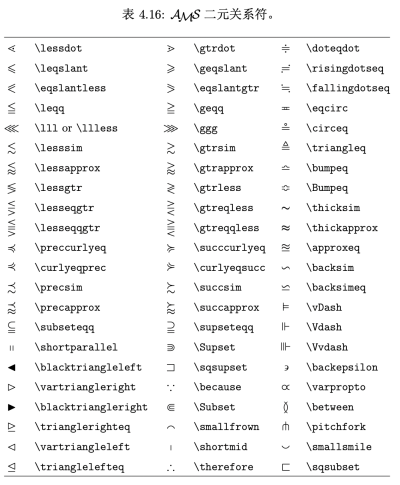
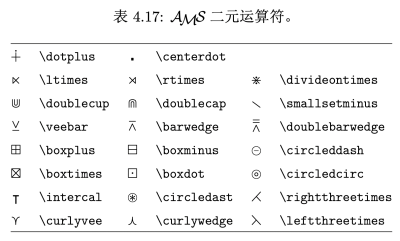
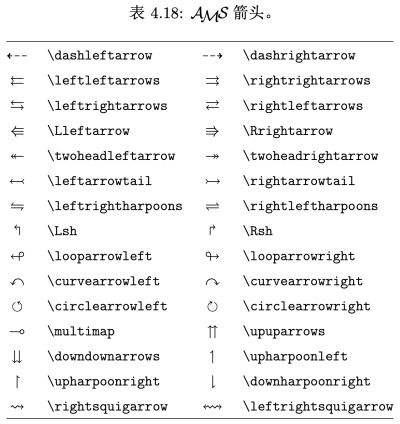
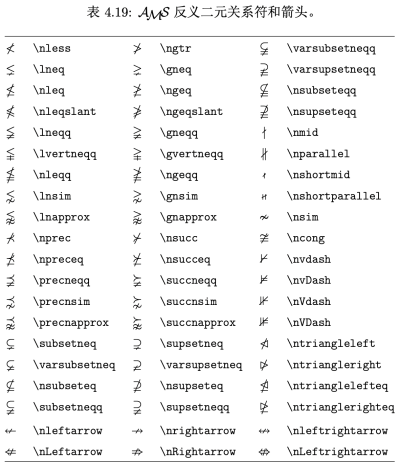
AMS 符号
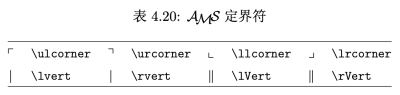
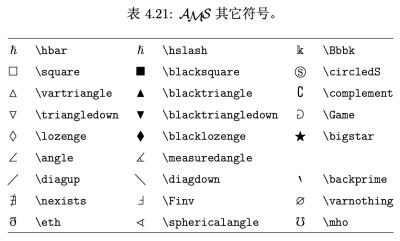
所有符号依赖 amssymb 宏包。
latex
\newtheorem{<theorem environment>}{<title>}{<section-level>}
\newtheorem[<theorem environment>][<counter>]{<title>}
<theorem environment> 为定理环境的名称。原始的 LaTeX 里没有现成的定理环境,不加定义而直接使用很可能会出错。<title> 是定理环境的标题(“定理”,“公理”等)。
定理的序号由两个可选参数之一决定,他们不能同时使用:
为用 \newcounter 自定义的计数器名称,定理序号由这个计数器管理。
如果两个可选参数都不用的话,则使用默认的与定理环境同名的计数器。
在以下示例代码中,我们定义了一个 mythm 环境,其序号设为 section 的下一级序号。注意 mythm 环境的可选参数以及 \label 的用法:
latex
\newtheorem{mythm}{My Theorem}[section]
\begin{mythm}\label{thm:light}
The light speed in vacuum
is $299,792,458\,\mathrm{m/s}$.
\end{mythm}
\begin{mythm}[Energy-momentum relation]
The relationship of energy,
momentum and mass is
\[E^2 = m_0^2 c^4 + p^2 c^2\]
where $c$ is the light speed
described in theorem \ref{thm:light}.
\end{mythm}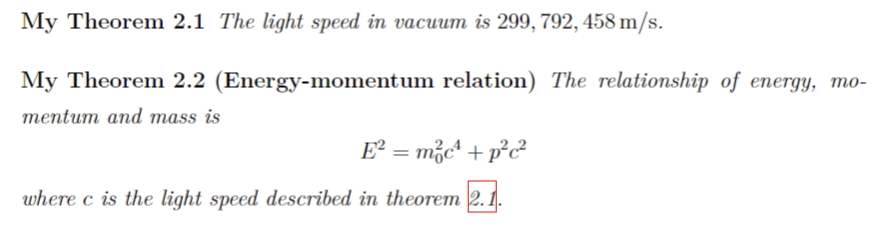
amsthm 宏包
LaTeX 默认的定理环境格式为粗体标签、斜体正文、定理名用小括号包裹。如果需要修改格式,则要依赖其他的宏包,如 amsthm、ntheorem 等等。本小节简单介绍一下 amsthm 的用法。
amsthm 提供了 \theoremstyle 命令支持定理格式的切换,在用 \newtheorem 命令定义定理环境之前使用。amsthm 预定了三种格式用于 \theorestyle;plain 和 LaTeX 原始的格式一致;definition 使用粗体标签、正体内容;remark 使用斜体标签、正体内容。
另外 amsthm 还支持带用星号的 \newtheorem* 定义不带序号的定理环境:
latex
\theoremstyle{definition} \newtheorem{law}{Law} \theoremstyle{plain} \newtheorem{jury}{law}{Jury} \theoremstyle{remark} \newtheorem*{mar}{Margaret}以上例子定义的 jury 环境与 law 环境共用编号,mar 环境不编号:
latex
\begin{law}\label{law:box}
Don't hide in the witness box.
\end{law}
\begin{jury}[The Twelve]
It could be you! So beware and
see law~\ref{law:box}.\end{jury}
\begin{jury}
You will disregard the last
statement.\end{jury}
\begin{mar}No, No, No\end{mar}
\begin{mar}Denis!\end{mar}
amsthm 还支持使用\newtheoremstyle 命令自定义定理格式,更为方便使用的是 ntheorem 宏包。感兴趣的读者可参阅它们的帮助文档。
证明环境和证毕符号
amsthm 还提供了一个 proof 环境用于排版定理的证明过程。proof 环境末尾自动加上一个 □ 证毕符号:
latex
\begin{proof}
For simplicity, we use
\[
E=mc^2
\]
That's it.
\end{proof}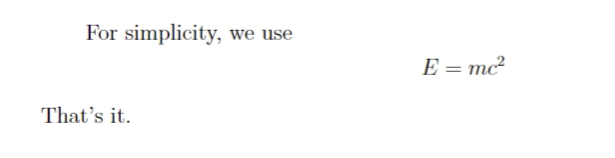
如果行末是一个不带编号的公式,□ 符号会另起一行,这时可使用 \qedhere 命令将 □ 符号放在公式末尾:
latex
\begin{proof}
For simplicity, we use
\[
E=mc^2 \qedhere
\]
\end{proof}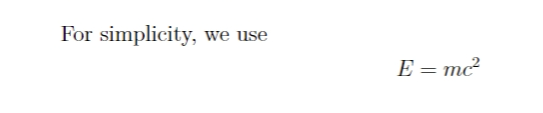
\qedhere 对于 align* 等命令也有效:
latex
\begin{proof}
Assuming $\gamma
= 1/\sqrt{1-v^2/c^2}$, then
\begin{align*}
E &= \gamma m_0 c^2 \\
p &= \gamma m_0v \qedhere
\end{align*}
\end{proof}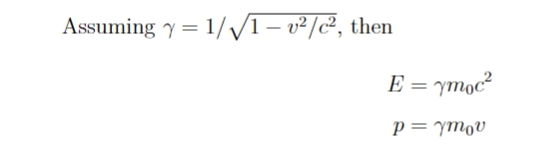
在使用带编号的公式时,建议最好不要在公式末尾使用 \qedhere 命令。对带编号的公式使用 \qedhere 命令会使 □ 符号放在一个难看的位置,紧贴着公式:
latex
\begin{proof}
For simplicity, we use
\begin{equation}
E=mc^2.\qedhere
\end{equation}
\end{proof}
在 align 等环境中使用 \qedhere 命令会使 □ 盖掉公式的编号:使用 equation 嵌套 aligned 等环境时,\qedhere 命令会将 □ 直接放在公式后。这些位置都不太正常。
证毕符号 □ 本身被定义在命令 \qedsymbol 中,如果有使用实心符号作为证毕符号的需求,需要自行用 \renewcommand 命令修改。我们可以利用标尺盒子来生成一个适当大小的“实心矩形”:
latex
\renewcommand{\qedsymbol}%
    {\rule{lex}{1.5ex}}
\begin{proof}
For simplicity, we use
\[
E=mc^2 \qedhere
\]
\end{proof}
符号表
有几个注意事项:
蓝色的命令依赖 amsmath 宏包(非 amssymb 宏包); 带有角标 ==ℓ== 的符号命令依赖 latexsym 宏包。
LaTeX 普通符号
表 4.4:文本/数学模式通用符号。
这些符号可用于文本和数学模式。
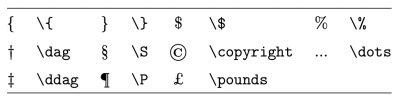
表 4.5:希腊字母。
\Alpha,\Beta 等希腊字母符号不存在,因为它们和拉丁字母 A,B 等一模一样:小写字母里也不存在 \omicron,直接用拉丁字母 o 代替。
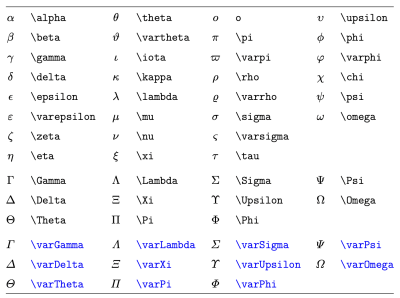
表 4.6:二元关系符。
所有的二元关系符都可以加 \not 前缀得到相反意义的关系符,例如 \not= 就得到不等号(同 \ne)。
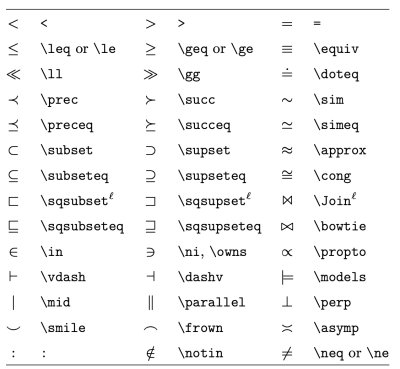
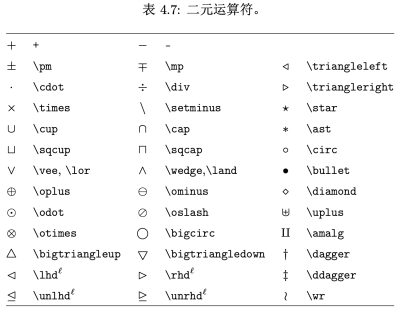
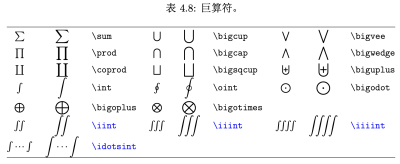
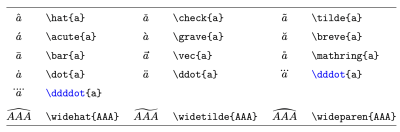
表 4.9:数学重音符号。
最后一个 \wideparen 依赖 yhmath 宏包。
AMS 符号
本小节所有符号依赖 amssymb 宏包。